Datalan — METIS Platform · 2026
How not to kill a top-tier product with a confusing website
METIS is an enterprise low-code platform for master data management: cleansing, deduplication and integration of company data into a single source of truth. The product was ready for bigger clients. Its website was not. It tried to say everything to everyone at once.
| Role | Senior Product Designer: UX audit, information architecture, website and app UI, user testing, design system |
| Product | METIS website and the app: Config, Data and Quality Manager |
| Methods | Competitor analysis, stakeholder and sales interviews, think-aloud testing, 5-second test, preference testing, predictive eye-tracking, Likert-scale questionnaire |
| Result | Over 90 % positive ratings on ease of use and findability · a design system of 110+ components |
The starting point
A product that grew, a website that didn’t
For years METIS lived with a very basic website and app. As it reached more clients, it needed a proper product landing page. There was also no UX process in-house, so before designing anything we had to set one up and agree on how the product should talk.
The biggest problem was the audience. In B2B and enterprise sales, the decision doesn’t start with IT.
First · CEO, CFO, HR
“Will this solve my problem, and how much does it cost?”
Then · CTO, Admin
Checks the architecture, modules and integration.
The old website mixed both conversations from the first screen. The information overload slowed down exactly the person who had to say yes first.
UX audit
What was getting in the way
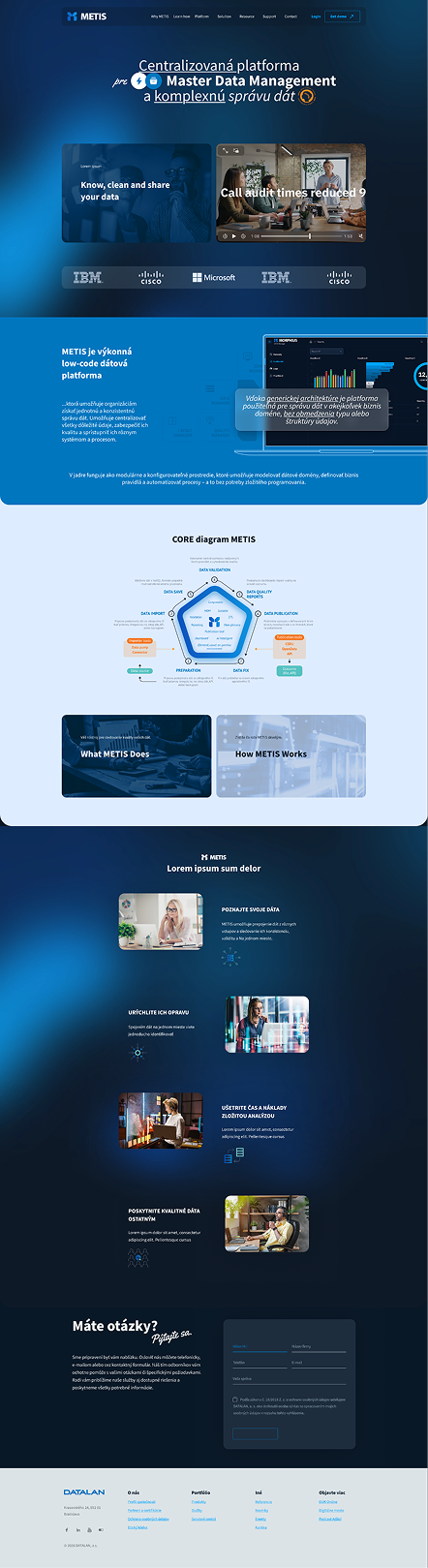
Visual smog
- Non-reusable boxes and too many different layouts.
- Generic stock photos of smiling people in an office, which users have long learned to ignore.
- Graphics layered on graphics, with opacities and gradients. Heavy and cluttered.
Copy that overloads
- Multi-line centred texts and lines over 1184 px wide.
- Three-column blocks of 8–12 lines that people skip automatically.
- Bold, underline, italics and a handwritten font, on a technical website.
Misleading CTAs
- The first button on the site said “Learn how” or “Training”. It signalled the system is hard to use.
- “More information” buttons everywhere sent people in loops instead of towards a demo or contact.
Content first
Content that drives decisions
I built the new structure from a competitor analysis and interviews with sales and stakeholders. Each block answers one question, in the order the buyer asks it.
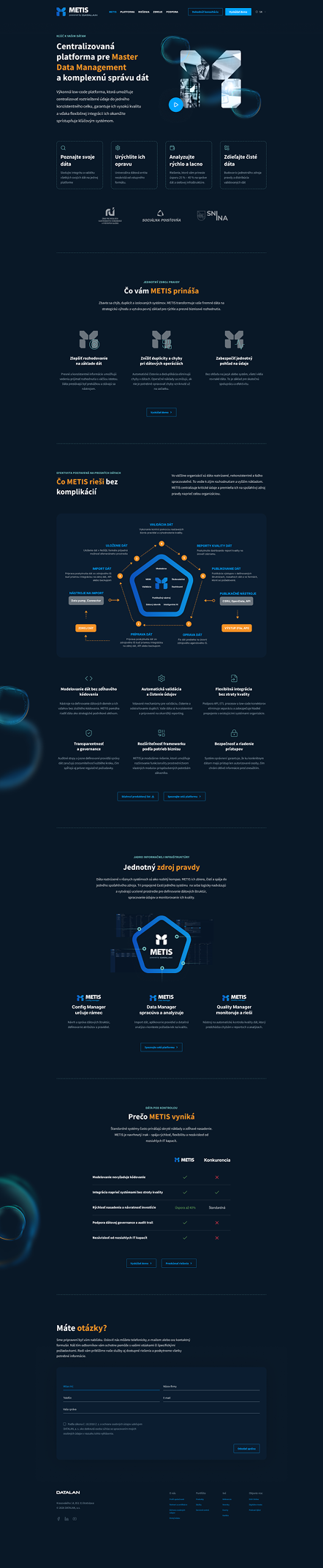
Hero: for the manager
Goal. Make an immediate impression on the decision-maker, without noise.
Design. A clean header, the business value said directly, and two clear actions: Schedule a consultation and Try a demo.
Business value: the basis for a decision
Goal. Translate technical parameters into saved time, lower cost and fewer errors.
Design. Three cards with clear icons instead of stock photos, scannable bullets with keywords in bold.
Platform and architecture: for IT
Goal. Answer the technical buyer’s questions about integration and modules.
Design. One clear data-flow diagram connecting Config, Data and Quality Manager. No stock photos, transparencies or gradients.
Why METIS: the comparison
Goal. Remove the fear of complex deployment and hidden costs.
Design. A comparison table highlighting low-code, security and speed, against “standard platforms” rather than named competitors.
Before
After
Validation
How to make sure we don’t miss the mark
The new design wasn’t built on assumptions. I validated it with moderated think-aloud sessions on desktop, a 5-second test, preference testing and a usability questionnaire, measuring success rate, time on task and cognitive load.
We wanted to know whether
- the navigation is intuitive,
- people find the key decision information (benefits, comparison, platform) without frustration,
- requesting a demo and contacting sales is fast and logical,
- the redesign lowers cognitive load and adds credibility compared with the old version.
5-second test
Participants saw the homepage for five seconds, then told us what caught their eye, what they remembered, what confused them, what the product is, who it’s for and which company is behind it. The last three we asked without mentioning METIS.
Five tasks on the prototype
| Conversion | “You want to see how it works in practice. Show me how you’d proceed.”Do they find Try a demo in the header or sticky menu? |
| Benefits | “Your boss asks what the system would bring the company. Where do you look for arguments?”Do they find “What METIS brings you”? |
| Competition | “Find out why METIS is better than standard alternatives.”Do they find and understand the comparison table? |
| Contact | “You need a specific feature. How would you ask the company?”Do they spot the primary contact CTA quickly? |
| Platform | “You’re in IT. Which modules does the system consist of?”Do they find Platform in the navigation? |
Preference testing, old vs. new
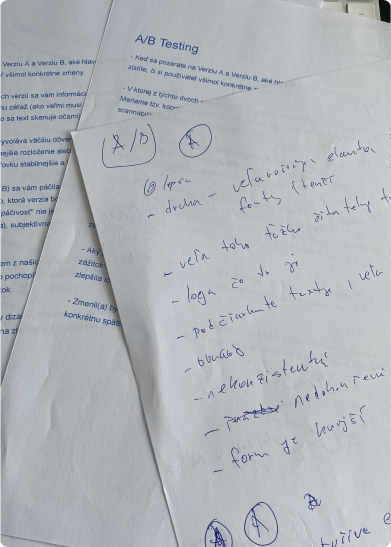
Instead of a live A/B test I chose qualitative preference testing on an interactive prototype. I didn’t only want to know what people click. I wanted their mental model: why they prefer a version and how they read the change. Participants matching the manager and IT personas compared both versions on scannability, trust and how fast they found answers for the purchase.

About the old version
“It’s a circus, way too much text.”
“It feels unfinished.”
“Too many distracting elements, underlined text and too many different fonts.”
“A lot of text that is hard to read.”
About the new version
“Less of a content dump.”
“I didn’t have to keep clicking through multiple subpages.”
“Better structure, clearer, less text, more professional.”
“Less cramped, much cleaner, a big step forward.”
Predictive eye-tracking
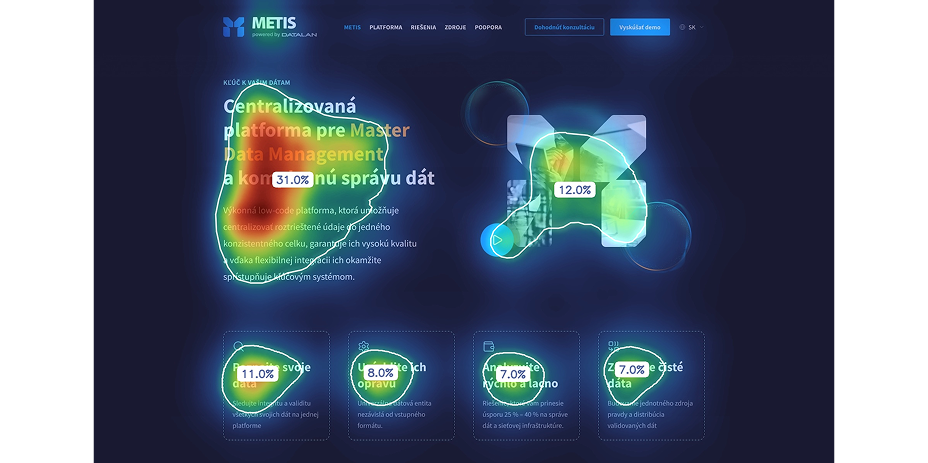
Before live testing I ran the designs through Attention Insight, an AI model trained on real eye-tracking studies that predicts where people look in the first 3–5 seconds. The heatmaps confirmed that first attention lands on the value proposition and the main CTA.
A questionnaire mapped to the goals
Instead of a generic SUS, I wrote 10 statements on a 5-point Likert scale mapped directly to the conversion goals and the information architecture: ease of use, clarity, finding the demo, platform details and contact. Positive and negative statements alternated, so people couldn’t just click through on autopilot.
of participants agreed or strongly agreed that the new website is intuitive and that information is quick to find. Perceived frustration dropped to a minimum.
Handoff
From confusing screens to a unified system
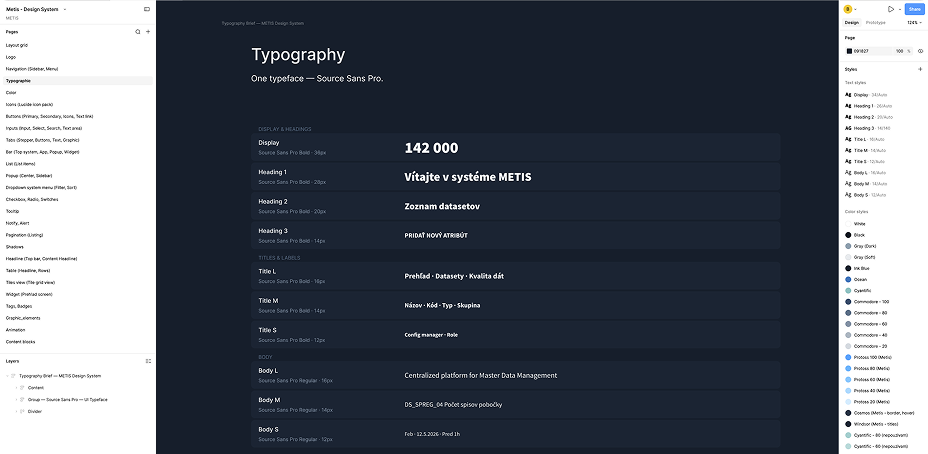
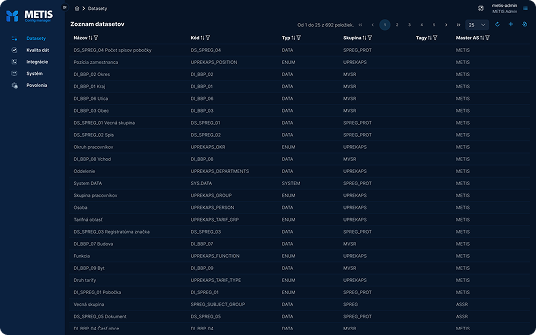
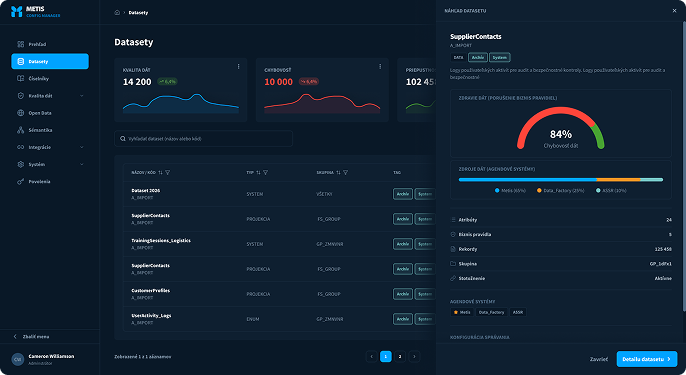
Validation wasn’t the end. To keep the build consistent and cut implementation effort, the visual rules became the foundation of a design system. It serves the whole ecosystem, from the first website visit to daily work inside the app.
components in the design system, shared by the website and the app.
desktop screens in the Config Manager, built on the same system.
Before
After
What this project shows
Design for who decides first
Ordering the page by the buying process, manager before IT, did more than any visual change.
Less is a decision
Removing stock photos, extra fonts and looping CTAs was the redesign. What stayed had to earn its place.
Evidence before code
Five methods, from AI heatmaps to think-aloud sessions, checked the design before a developer touched it.
Built to scale
The same 110+ components now carry the website and hundreds of app screens.